

An app for iPhone and Android
Sivan Plus For the independent instructor
The whole teaching day, in one app.
From the next lesson to the report for your accountant: calendar, students, finances and documents in one app. Data is managed locally on the device, with backup and online services as needed. It also suits managing several instructors, vehicles and branches.
- On iPhone, Android and iPad
- Data on the device, with backup
- Hebrew, Arabic, Russian and English
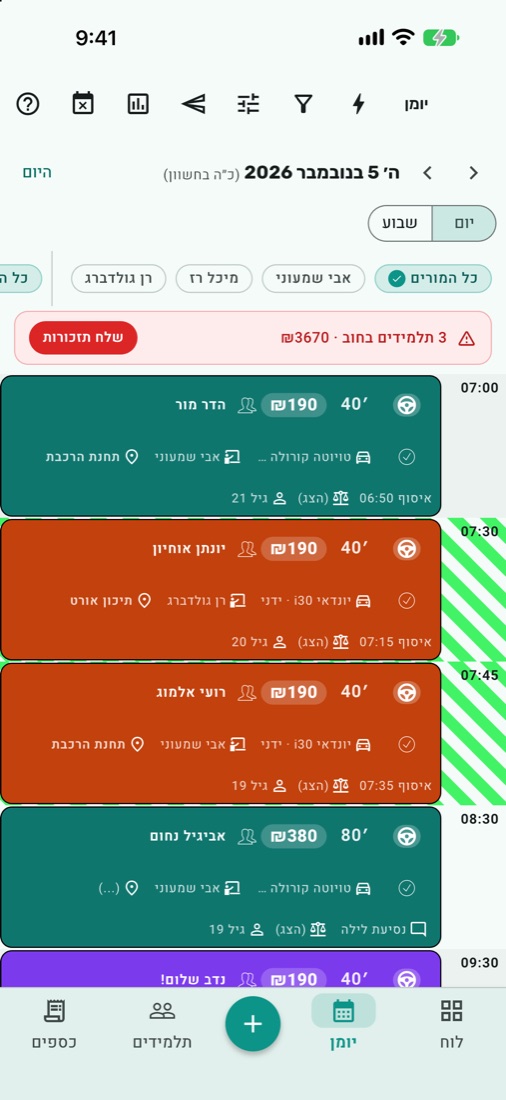
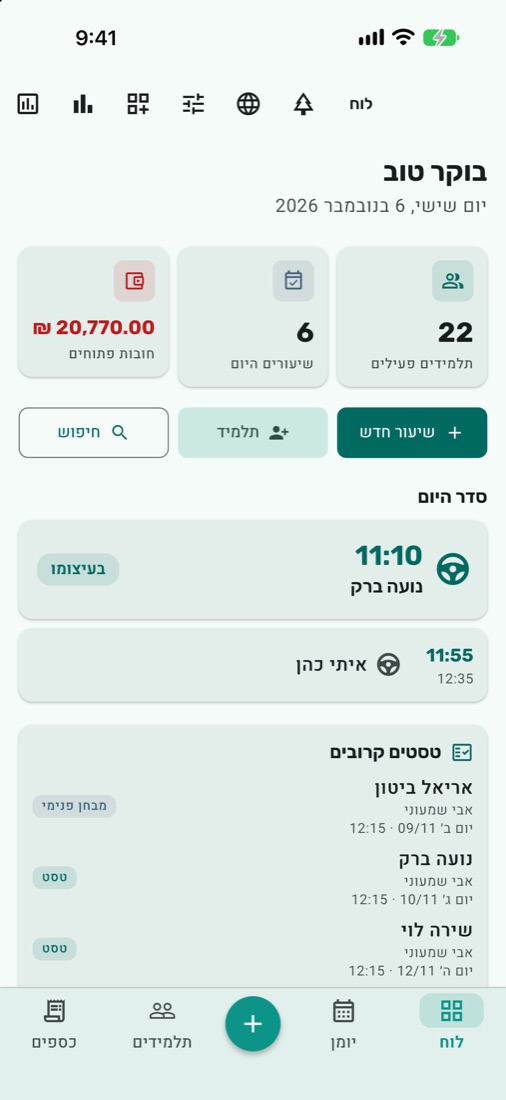
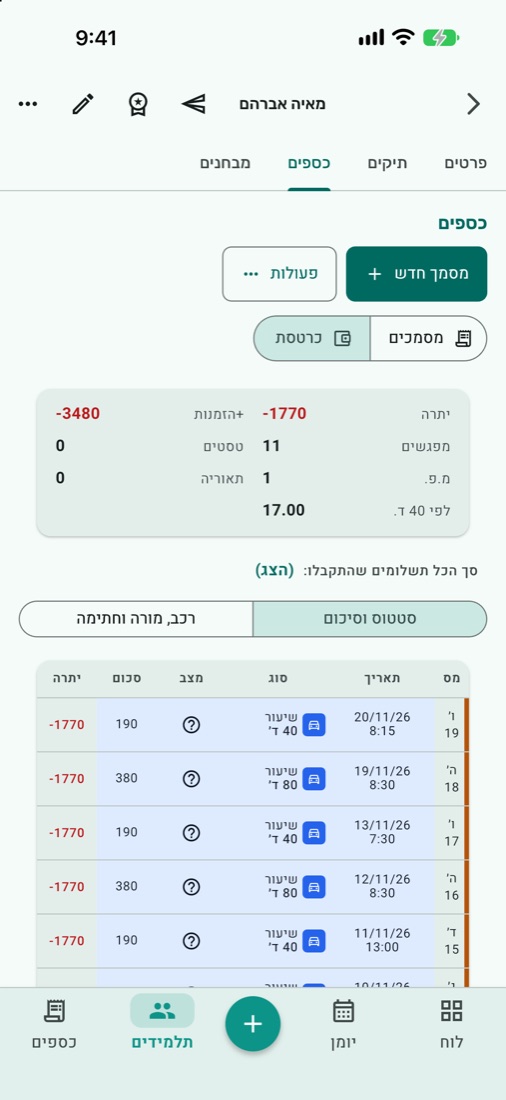
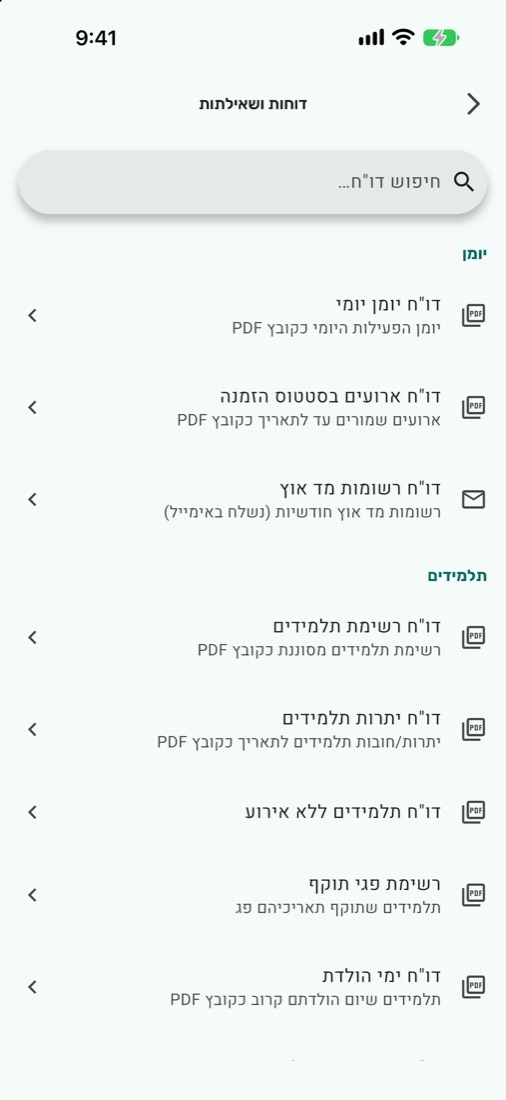
Screenshots from the products · All data is illustrative and fictional
Tools for everyday work
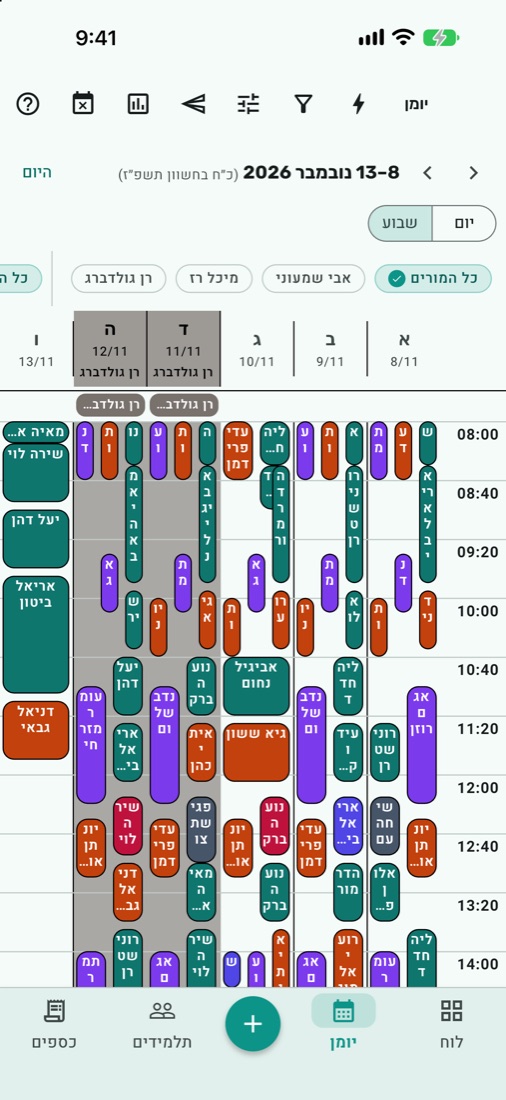
A calendar built around the teaching day
A daily and weekly calendar that brings together the time, vehicle, instructor, pick-up point and the student's balance. You can see the free slots and plan the next day.
- Colours by event type, vehicle or status; filtering by instructor and vehicle, time off and blocked times.
- Adjustable text size, dark mode, working hours and days of your choice, and the Hebrew date and Israeli holidays.
- Sync lessons, driving tests and appointments to a separate Sivan Plus Google calendar, according to your sync choices and with an internet connection.
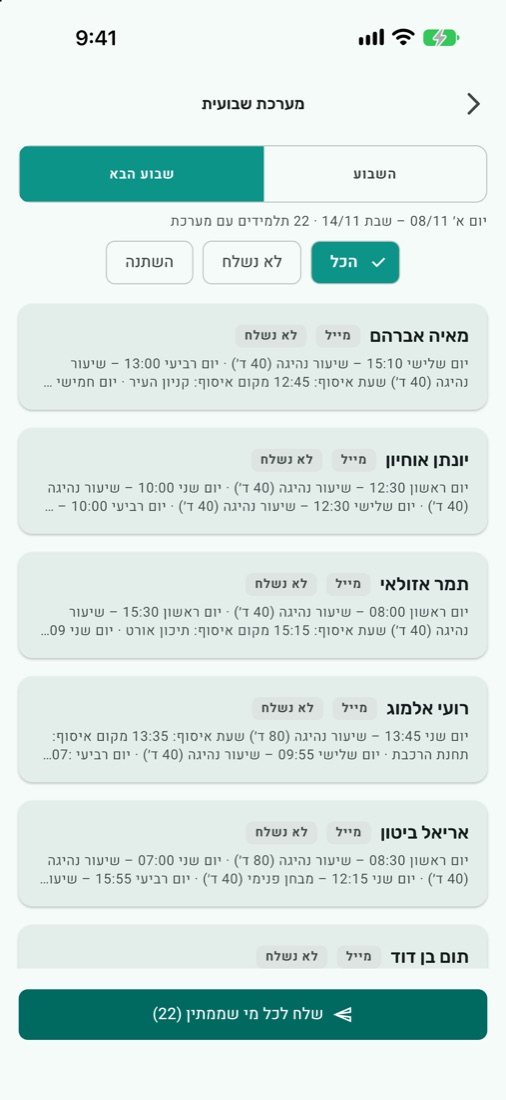
- The weekly schedule prepares each student's lessons and pick-up times. You move from student to student and send through the appropriate channel; your progress is saved.
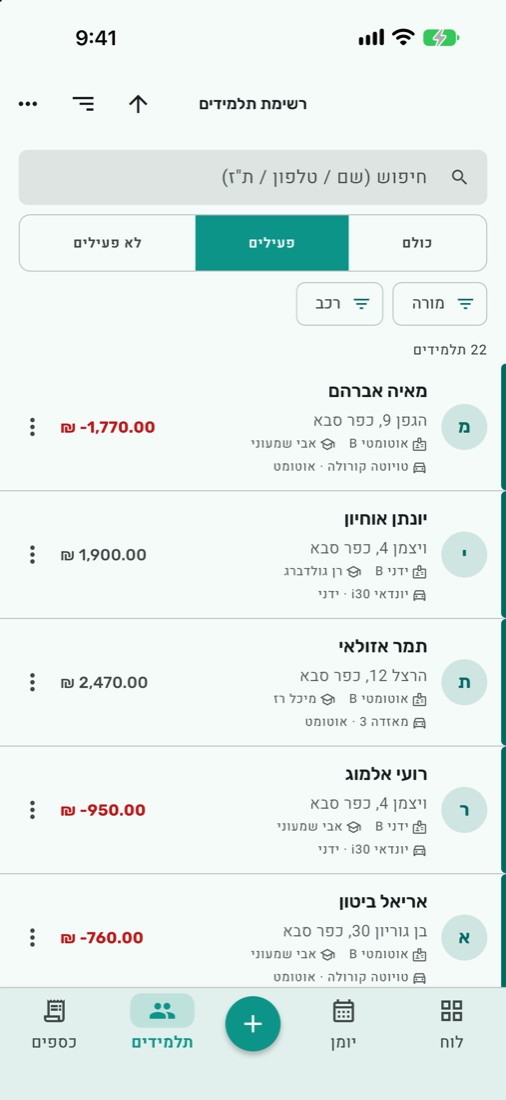
Every student, with the full picture
Student details and student files, lessons, tests, documents and balances, together in the place where you manage the teaching.
- Agreements and price lists, including packages and tiered pricing; the lesson price is taken from the agreement.
- A ledger that links lessons, charges, discounts and documents, with colours by type and status.
- Learning tasks by stage, tracking of dates and tests, and letters for when a student starts and when a student leaves.
- Messages about bookings, changes and cancellations, and debt reminders, by WhatsApp, SMS or email, according to the settings and the channel you choose. Messages are adapted to the student's language.
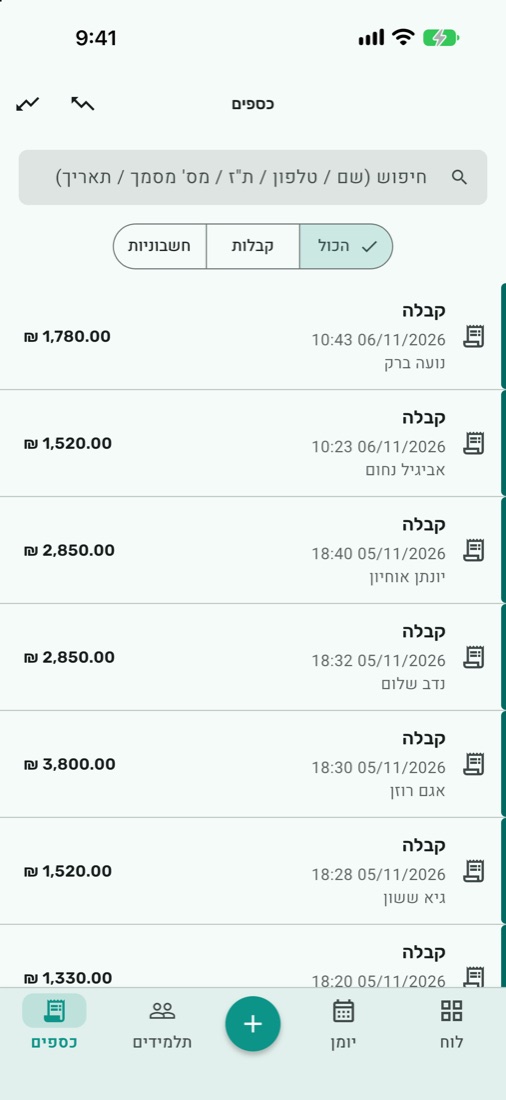
From lesson to document, and from document to report
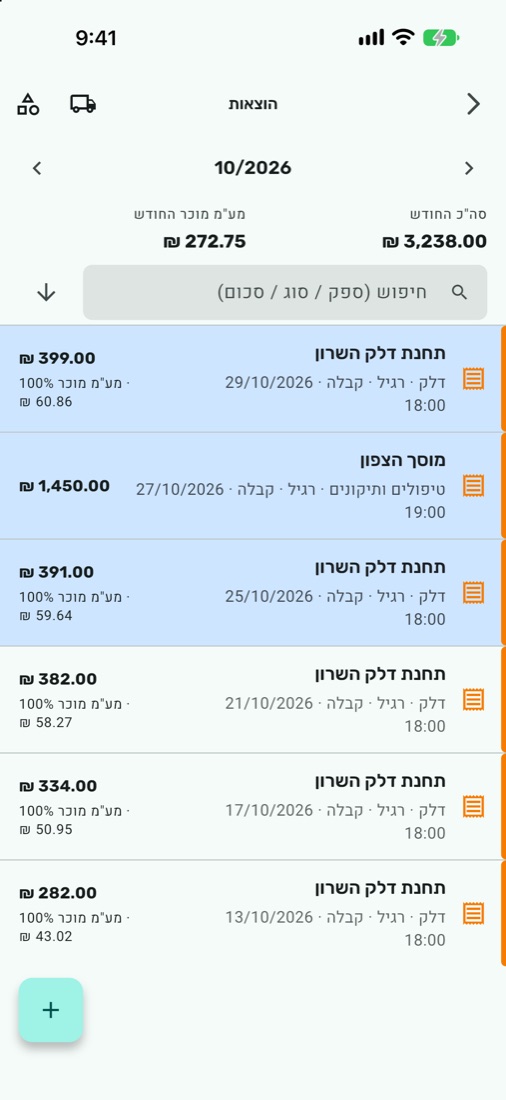
Income, expenses and the documents that go with the work, with tools for passing the information to your accountant.
- Receipts, invoices, tax invoice-receipts and credit notes; recording of payment methods and payment references.
- Sending PDFs and printing on a thermal printer over Bluetooth on iOS and Android.
- Requesting allocation numbers when issuing the relevant documents, subject to the appropriate connection and permissions.
- Recording expenses by supplier, expense type and vehicle, and managing input VAT and documents.
- Dozens of reports for the business: invoice, expense, VAT and income tax reports, activity summaries and charts; PCN874 and unified format files for filing reports.
When you manage more than one instructor
Managing instructors, vehicles and branches, alongside dedicated tools for the professional manager.
- Vehicle permissions for instructors, time off, moving students between vehicles and allocating driving tests.
- Internal tests for other instructors' students: scheduling in the calendar, recording payment, results, and letters to the student, the instructor and the school.
- Funding bodies: payment requests, documents and the funding body's ledger.
- Managing vehicles, licence validity, downtime and odometer. Quick access to Berosh; on Android, a driving test SMS can be brought into the calendar.
Work locally, with services as needed
The app supports Hebrew, Arabic, Russian and English, on iPhone and Android, and also on iPad.
- The calendar, students and ledger work with the data stored on the device, even without reception.
- Receipts and invoices can be issued without a connection for up to five days after the last connection.
- Manual local backup or an automatic backup service, according to the setting and the service you have chosen.
- Email, allocation numbers, Google sync and other server services require an internet connection.
Online services, including server backup, report generation and allocation number requests, require an internet connection and appropriate settings.
Questions and answers
Devices, customisation and data
Which devices and languages does the app support?
On iPhone and Android, and also on iPad. The app supports Hebrew, Arabic, Russian and English.
What can I do without the internet?
The calendar, students and ledger work locally. Receipts and invoices can be issued for up to five days after the last connection. Email, allocation numbers, Google sync and server services require a connection.
How is the data backed up?
The data is stored on the device. You can create a manual local backup, or use the automatic backup service once it is set up and according to the service you have chosen.
Can I adapt the calendar to the way I work?
Yes. You can choose colours, text size, dark mode, working hours and days, spacing and the information shown, and filter by instructor and vehicle.
How does sync with Google Calendar work?
The app creates a separate Sivan Plus calendar and updates it with events that were created, changed or cancelled. You choose the event types, instructors and time range. Sync requires an internet connection.
What if I already work with the previous Sivan Plus?
Contact us to review the move and your existing data, and to arrange the right process before you switch systems.
Students, team and the professional manager
Do students get reminders and a weekly schedule?
You can prepare messages about lessons, changes and cancellations, a weekly schedule and debt reminders. In the weekly schedule you move from student to student and send through the appropriate channel. Sending options depend on the channel and the settings.
Does it also suit several instructors and vehicles?
Yes. You can manage instructors, vehicles and branches, with calendar filtering, time off and vehicle permissions per instructor, alongside student transfers and driving test allocation.
What does a professional manager who tests other instructors' students get?
A process that includes scheduling in the calendar, payment in the examinee's name, recording the result, a form and result letters, sending options and a report of the tests.
Documents, expenses and the accountant
Which documents can I issue?
Receipts, invoices, tax invoice-receipts and credit notes for a student, a customer or a funding body. You can send a PDF or print on a thermal printer on iOS and Android.
How do allocation numbers work?
You connect the app to the Israel Tax Authority in the settings. For the relevant documents, an allocation request is made at the time of issue, subject to connection and permissions; you can follow the status of the request.
Can I record expenses too?
Yes. Expenses by supplier, expense type and vehicle, with documents and input VAT, alongside tracking of vehicles and odometer.
Does the app replace the accountant?
No. It brings together income, expenses and data for reports, so you can pass your accountant organised information and work with them efficiently.